


Image generation and alteration
Topcon's visual identity is built on authenticity. AI may support that standard, but it may never replace it.
Do
Use AI to extend the foreground or background of an existing photo
Remove minor scene distractions from real photographs
Generate concept visuals to communicate an idea to the creative team
Submit all AI-assisted images for brand approval before use

Don't
Generate any photograph or illustration from scratch using AI
Modify or generate any image of Topcon products
Replace or generate any person's face using AI
Remove OEM logos or third-party branding from scenes

On products: AI must never be used to generate or alter images of Topcon products. Results are unpredictable — buttons or controls that do not exist may appear, materials may look incorrect, and branding may become distorted. A single inaccurate product image can create false advertising liability and damage customer trust.
On people: It is strictly forbidden to generate, alter, or synthesize any image of a Topcon employee or executive. AI-generated likenesses can be used for phishing, impersonation, and fraud and carry significant legal liability across many jurisdictions globally.
Using AI to build scenes around 3D product illustrations
One of the most effective permitted uses of Generative AI is using Photoshop's Generative Fill feature to build realistic environments around our existing 3D product illustrations. This workflow keeps the product accurate, while AI handles the surrounding scene.
What the difference looks like
The examples below show why starting from an approved 3D illustration matters. A fully AI-generated image has no connection to Topcon's assets, animation style, or visual standards. The asset-grounded approach keeps the product accurate and consistent with the rest of our library.
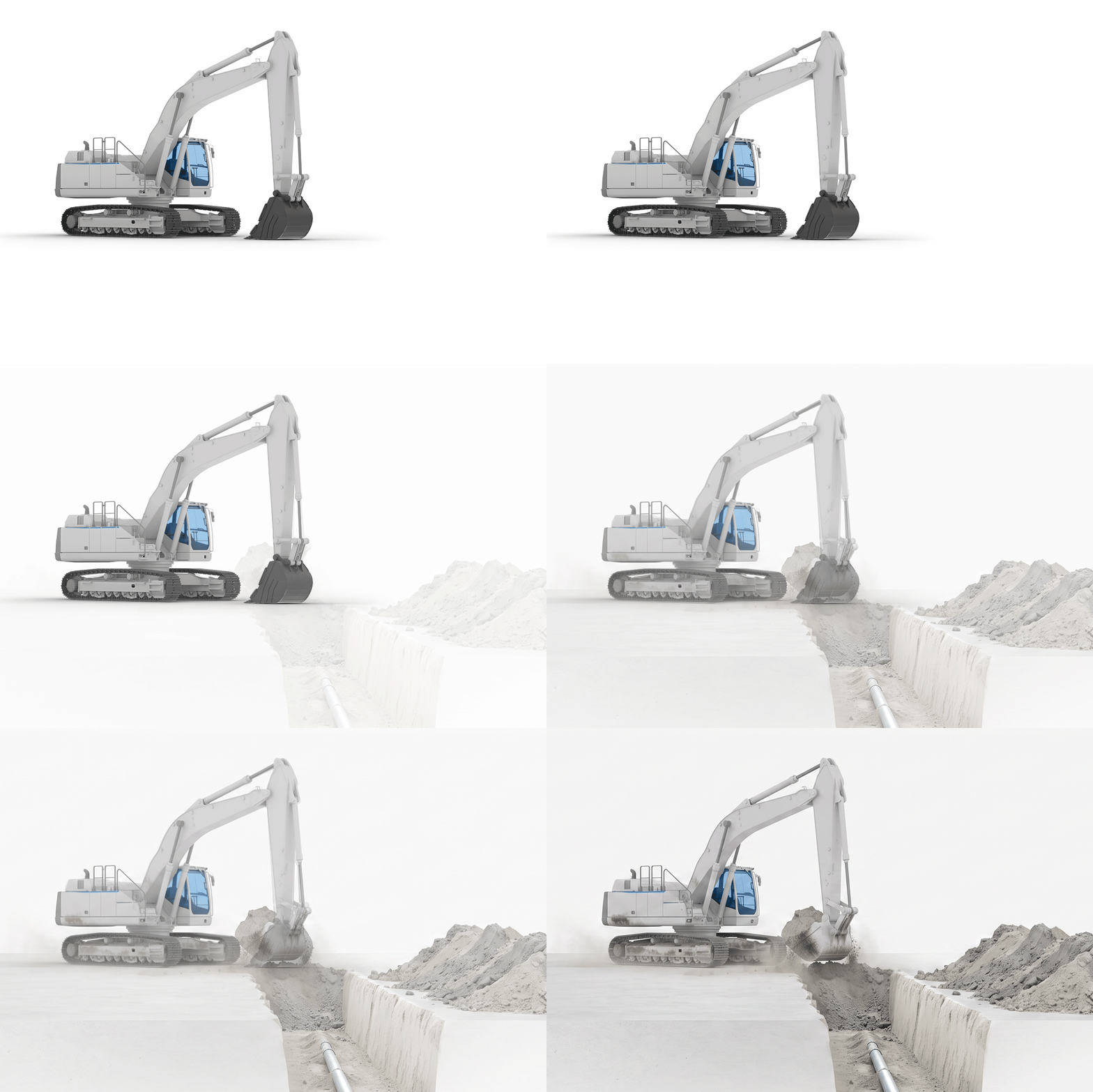
Built on an approved 3D illustration
The product comes from an approved Topcon 3D illustration. Photoshop's Generative Fill adds only the surrounding scene. The product is accurate, consistent with our visual library, and the overall result aligns with our animation and illustration style.

No connection to Topcon assets
Generated entirely from a text prompt with no Topcon source material. The product proportions, materials, and style are inconsistent with our illustrations. The result looks plausible but does not represent any real Topcon product accurately.
Key rules for this workflow
Do
Use only approved 3D product illustrations as the source asset
Review all generated options before selecting a result
Focus AI generation on the surrounding environment only
Submit all final assets for brand approval before use
Don't
Do not allow the AI fill to overlap or alter the product itself
Do not include people in your prompts or in the generated scene
Do not use AI-generated scenes with actual product photography
Do not upload 3D source files or unreleased product data to any AI tool
Sample prompt guide
A guide to prompt writing for this workflow, including tested prompts by scene type, is available for internal teams and approved agency partners. Access is restricted to ensure these prompts are used within the context of these guidelines.
Generative AI Sample Prompt Guide
Photoshop Generative Fill prompts organized by scene type, with prompt writing tips and usage guidance.
Access and distribution: This prompt guide is for internal use and approved agency partners only. It is not for public distribution.